
Why Sign Up With TP Play
Setting up a TP Play account opens the whole platform at once — a wallet for deposits and withdrawals, the entire game catalogue, and every promotion currently on offer, headlined by a first-deposit welcome bonus of up to 288%. There's no separate sign-up path for the app versus the browser, so the account you build here works on both instantly, keeping your balance and history in sync regardless of where you play. Signing up takes under a minute and asks for nothing beyond a mobile number and a password of your own choosing — no document uploads, no waiting around, no approval queue standing between you and play. If you landed here after reading about the games, the bonuses or the app elsewhere on this site, this is the one step that turns all of that into a real, working account.
Getting Registered, Step By Step
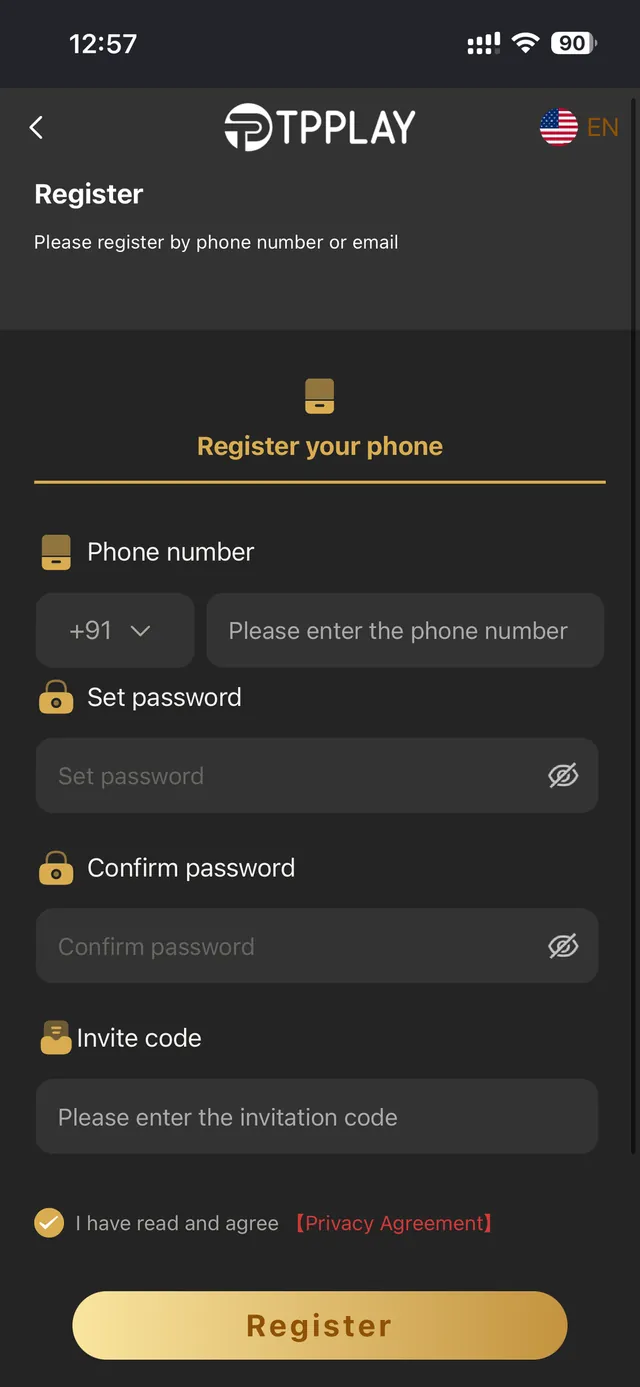
Hit Register, type in your mobile number with the right country code, pick a password you'll actually remember, and confirm it a second time. Got a referral from a friend? Drop their invite code into the optional field — it's what ties your first deposit to their referral reward, and it's the only field on the entire form you can skip. Tick the terms checkbox after reading it, then hit Register to wrap up. Your account and wallet go live the instant the form is submitted, and from then on you can sign in with that same mobile number and password from any device.
Making Use Of An Invite Code
An invite code is never mandatory, but if a friend passed one along, entering it at the point of registration is the only window in which it can be applied — there's no way to add it after the account already exists. Invite codes usually unlock a bonus extra for you as the incoming player, while also crediting whoever referred you with ongoing commission on your future activity. No code on hand? Just leave the field empty and sign up as normal — it has zero bearing on your ability to open an account, deposit, or play anything in the library.
What Comes After You Sign Up
As soon as your account exists, your wallet is live and ready to accept a first deposit. That first deposit is exactly where the welcome bonus kicks in, lifting your starting bankroll by up to 288% based on whatever promotion terms are currently listed on the Promotion page. From there, each further deposit can qualify for daily cashback, and passing along your own invite link opens the door to referral commission — up to 85% — on any friends who sign up through it. Fresh accounts also launch at the entry-level VIP tier, with perks that climb automatically the more you play, no separate sign-up needed.
Locking Down Your Freshly Created Account
Pick a password you haven't reused anywhere else, and keep the mobile number tied to your account up to date — it's the single detail that gets you back in if you ever forget your password down the line. TP Play will never ask you to hand over your password through Telegram, email or any channel besides the official sign-in screen, so any message requesting your credentials directly should be treated as a scam. Transactions on the platform travel over encrypted connections, and withdrawal requests are verified before funds move — the same standard baseline you'd expect from any platform handling genuine deposits and withdrawals.
Right After You Register: What's Next
With your account created, the quickest path into play is making your first deposit so the welcome bonus applies automatically on qualifying amounts. From there, explore the game categories — Aviator-style crash games, Win Go colour prediction, slots, cricket betting, fishing, roulette, lottery draws and live game shows all live inside the same lobby. Prefer playing from your phone without keeping a browser tab open? The Download App page carries the official Android APK, and the APK Install Guide walks through every step if this is your first time installing an app from outside the Play Store.
Registration Slip-Ups Worth Avoiding
The number one reason a sign-up form gets rejected is a mobile number missing its correct country code, or carrying a stray space or digit left behind from copying it from somewhere else. Give the number a second look before submitting, since it's also what your account recovery relies on down the road. Picking a password that's too short, or reusing one from another account, is the second common misstep — go with something you haven't used before, since a unique password is the biggest single lever you have over your own account's security. If an invite code isn't registering, confirm it was entered exactly as given, capital letters, leading zeros and all — codes are typically case-sensitive.
Signing Up From A Phone Compared With A Desktop
The sign-up form behaves identically whether you're using a phone, a tablet or a desktop browser, and the account it creates is never locked to whichever device you used to join. That means registering on a desktop browser out of convenience, then signing in on the Android app later with that exact same mobile number and password, works perfectly — your account will already be fully set up and deposit-ready. Registering on mobile with plans to install the app afterward? No need to sign up twice — one account covers both, and the Download App page explains how to grab the APK whenever you're ready to leave the browser behind. Whatever device you start on, hold onto your login details somewhere safe, since that's what gets you back into that same wallet from anywhere else later.
Already have an account? Sign in to TP Play.